

Build your React or Vite app, upload it to your hosting, fix 404 errors on page refresh with a single-page-app rewrite and connect it to your API.

- Applies toMERN and web hosting
- Time needed15 min
- LevelBeginner to intermediate
A React or Vite app is just static files after npm run build: HTML, JavaScript, CSS and images. They do not need Node.js on the server, only a web server that can serve files and send every unknown route to index.html.
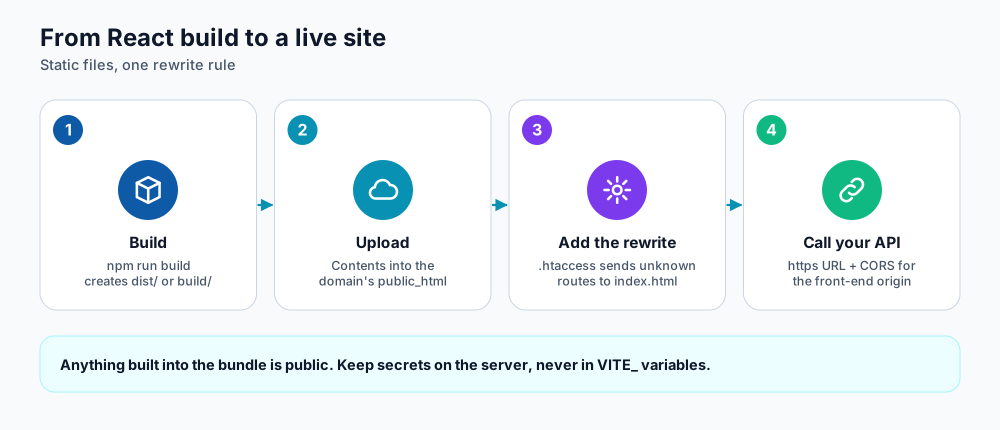
From build to a live site.
1. Build for production
npm ci
npm run build
# Vite creates dist/, Create React App creates build/
Check the output locally with npx vite preview before uploading.
2. Point the build at your API
The front end needs the API's address. In Vite, variables that start with VITE_ are baked into the bundle at build time:
VITE_API_URL=https://api.example.comconst res = await fetch(`${import.meta.env.VITE_API_URL}/products`);3. Upload the files
- Open the File Manager, go to the document root of your domain (usually
public_htmlor the folder you chose for the domain). - Delete the placeholder
index.html, then upload and extract your build output so thatindex.htmlsits directly in that folder. - Make sure HTTPS is active (see Free SSL in Webuzo).
4. Fix 404 errors on refresh
React Router and similar libraries change the address in the browser without asking the server. When someone refreshes /orders/42 the server looks for a folder with that name, finds nothing and returns 404. A rewrite rule fixes it by serving index.html for anything that is not a real file.
RewriteEngine On
RewriteBase /
RewriteRule ^index\.html$ - [L]
RewriteCond %{REQUEST_FILENAME} !-f
RewriteCond %{REQUEST_FILENAME} !-d
RewriteRule . /index.html [L]
Save this as .htaccess in the same folder as index.html. It works on LiteSpeed, OpenLiteSpeed and Apache.
5. Allow the front end to call the API
When the front end (app.example.com) calls the API (api.example.com), the browser enforces CORS. Allow exactly your front-end origin on the server:
const cors = require('cors');
app.use(cors({ origin: 'https://app.example.com', credentials: true }));
Always call the API over https. An http:// API behind an https:// page is blocked as mixed content (see the mixed-content guide).
Next.js
- Static export (
output: 'export') produces plain files you can upload exactly like a Vite build. - Server rendering needs Node.js. Deploy it as an application in Webuzo using Self Managed mode with a start command such as
npm run start(which runsnext start) on the assigned port.
Speed tips
- Build output filenames include a content hash, so you can cache
assets/for a long time. - Compress images and prefer WebP or AVIF.
- Split large routes with dynamic
import()to keep the first load small. - Serve the app through a CDN if you have visitors in many countries.
Frequently asked questions
My page is blank after upload
Open the browser console. A 404 on the JavaScript file usually means the files are in the wrong folder or the base option points to a different path. A CORS error means the API must allow your front-end origin.
Can I host the front end and API on one domain?
Yes, but it needs path-based routing for the API. Using two subdomains is simpler and works well on this hosting.
How do I deploy updates?
Build again, upload the new files over the old ones and keep the .htaccess file. A hard refresh clears cached assets.
References and further reading
Last reviewed 19 October 2026. Need a hand? Contact DignityHost support or open a ticket from your client area.
