

Use your hosted Hermes Agent: sign in to the dashboard, set model keys, call the OpenAI-compatible API, connect Telegram and use the web terminal safely.
- Applies toHermes Agent hosting
- Time needed20 min
- LevelIntermediate
Hermes Agent is an open-source agent from Nous Research designed to grow with you: it creates skills from experience, remembers across sessions and can run scheduled tasks in plain language. It is not tied to a laptop, so it is a natural fit for hosting: you can talk to it from Telegram while it works on a server.
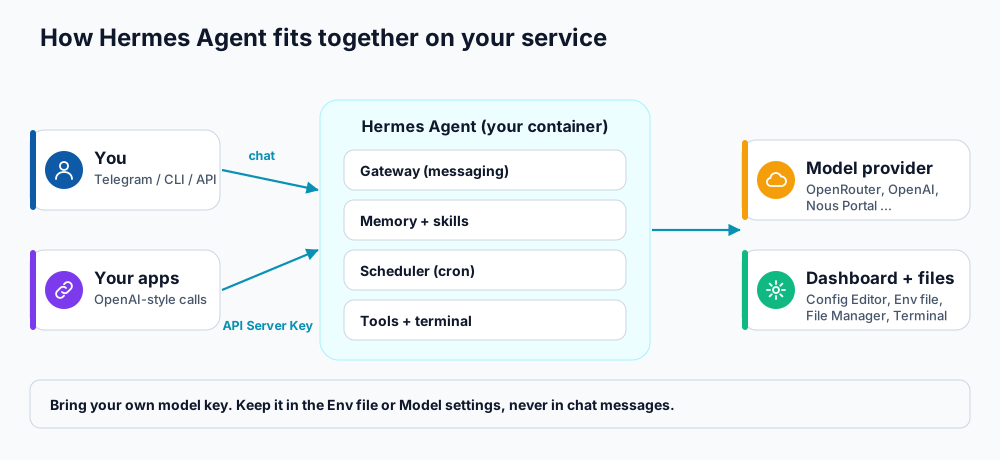
How the pieces fit together on your service.
The management panel
| Tab | What it gives you |
|---|---|
| Overview | Domain, version, CPU and memory limits, and the username and password for the Hermes dashboard, the web terminal and the file manager. |
| API Details | The OpenAI-compatible API address, the API Server Key and a health-check example. |
| Telegram | Connect a Telegram bot token and approve chats. |
| Resources | Live usage against plan limits. |
| Settings | Service repair, soft and full reset, and password changes. |
| Config Editor / Env file | View and edit the agent's configuration and the container's environment variables. |
| Terminal Access / File Manager | A browser terminal for hermes commands and a file browser. |
Step 1: sign in to the Hermes dashboard
- Open the Overview tab and copy the username and password.
- Open the Hermes dashboard from the panel and sign in with them.
- In the dashboard open the Models and Keys pages to choose your provider and paste its API key. You can also run
hermes setupin the web terminal.
Hermes works with many providers, including OpenRouter, OpenAI and your own endpoint. Create a dedicated key with a spending limit (see the AI agent security checklist).
Step 2: use the OpenAI-compatible API
The API runs on its own hostname, separate from the dashboard, so tools that speak the OpenAI API format can talk to your agent. Open API Details; you will see the API base URL and the API Server Key.
# check that the API is up
curl https://YOUR-API-HOST/v1/health -H "Authorization: Bearer YOUR_API_SERVER_KEY"

# most OpenAI-compatible clients only need these two values
Base URL : https://YOUR-API-HOST/v1
API key : YOUR_API_SERVER_KEY- Use the API Server Key as the Bearer token (or "OpenAI API key") in Open WebUI, LibreChat or your own scripts.
- Append paths such as
/chat/completionsto the base URL. - Do not use the dashboard address for
/v1calls; that is a different service. - To rotate the key, use Change API Server Key. Leave it blank to generate a new one. The container is recreated and old clients stop working until they receive the new key.
You can also call your agent from n8n with an HTTP Request node (see 10 practical n8n automations).
Step 3: connect Telegram
- Create a bot with @BotFather and copy the HTTP API token.
- Open the Telegram tab, paste the token, save, and wait 2 to 3 minutes while the container is recreated.
- Message your bot. It replies with a pairing code. Paste the code (or your chat ID) into Telegram approval code or chat ID in the panel and approve.
- If a phone or CLI client shows pairing required, start a connect request there, then press Approve device in the panel.
Terminal, config and environment
- Web terminal: stopped by default to save resources. Press Start, wait 1 to 2 minutes, then open it with the same username and password as the dashboard. It runs
hermescommands only, such ashermes setup,hermes model,hermes chatandhermes status; typehelpfor the list. - Config Editor: shows the persisted configuration file. If it is YAML, the editor is read-only to protect your comments; change settings in the dashboard or with
hermes config set. Restart from the Overview tab for changes to apply. - Env file: edits the container's
.env. Saving recreates the container, so allow 2 to 3 minutes.
Frequently asked questions
What is the difference between the dashboard and the API?
The dashboard is the web interface where you configure the agent. The API is for programs and clients that want to talk to the agent using the OpenAI format.
Does Hermes remember things between chats?
Yes. It keeps memory and builds skills over time, stored in your container's data volume. Back up important configuration before any reset.
Can I use my own model server?
Yes. In the dashboard choose a custom OpenAI-compatible endpoint and enter its URL and key.
References and further reading
Last reviewed 19 October 2026. Need a hand? Contact DignityHost support or open a ticket from your client area.
