

Stop business email landing in spam. Learn what SPF, DKIM and DMARC do, how to add the DNS records and how to test them on DignityHost email hosting.
- Applies toDomains sending email
- Time needed20 min
- LevelIntermediate
Receiving mail servers ask one question about every message: is the sender really allowed to use this domain? SPF, DKIM and DMARC are three small DNS records that answer it. Without them Gmail, Outlook and Yahoo are far more likely to treat your mail as spam, or to reject it.
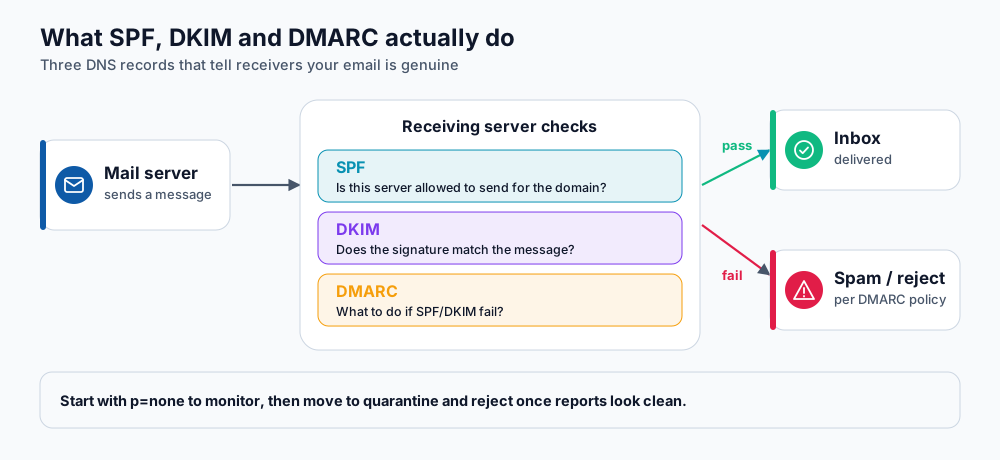
How a receiving server uses the three records.
The three records in plain words
| Record | What it proves | Where it lives |
|---|---|---|
| SPF | The sending server is on the domain's list of allowed senders. | A TXT record on yourdomain.com. |
| DKIM | The message was signed by the domain and was not changed in transit. | A TXT record on a selector name such as default._domainkey. |
| DMARC | Tells receivers what to do when SPF and DKIM fail, and where to send reports. | A TXT record on _dmarc.yourdomain.com. |
Step 1: SPF
Your SPF record lists every service allowed to send as your domain: your hosting mail server, plus any newsletter or invoicing tool. There must be only one SPF record per domain.
yourdomain.com. TXT "v=spf1 +a +mx include:_spf.example-sender.com ~all"+a +mxallows your own web and mail servers.include:adds each external service. Use exactly the value that service gives you.~all(soft fail) is a safe starting point. Move to-allonce you are sure the list is complete.
Step 2: DKIM
On cPanel plans, open Email → Email Deliverability. It shows SPF and DKIM status for each domain and a Repair button that creates the records when your DNS is hosted on the same account. If your DNS is elsewhere (for example Cloudflare), the tool shows the exact TXT values to copy into that DNS zone.
Other sending services (newsletters, CRMs) give you their own DKIM records. Add them as instructed; several DKIM records can coexist because each uses a different selector.
Step 3: DMARC
Start in monitoring mode so nothing is blocked while you check the reports:
_dmarc.yourdomain.com. TXT "v=DMARC1; p=none; rua=mailto:[email protected]; fo=1"- Leave
p=nonefor two to four weeks and read the aggregate reports. - Fix any legitimate sender that fails SPF or DKIM.
- Change the policy to
p=quarantine, then, when reports stay clean, top=reject.
Step 4: test
- Send a message from your domain to a Gmail address, open it, choose Show original, and check that SPF, DKIM and DMARC all say PASS.
- Look the records up with MXToolbox to catch typos or duplicate SPF records.
- If you send bulk email, register with Google Postmaster Tools to watch your reputation.
p=reject before checking reports.Frequently asked questions
Do I need all three?
Yes. Gmail and Yahoo require SPF and DKIM for everyone and DMARC for bulk senders, and a published DMARC record also helps protect your brand from spoofing.
Why does my mail still go to spam?
Authentication is necessary but not sufficient. Reputation, content, links and sending volume matter too. Warm up new domains slowly and avoid purchased lists.
Where do I add these records?
In the DNS zone that is active for your domain. If your nameservers point to DignityHost, use the DNS zone editor in your panel; if they point to Cloudflare, add them there.
References and further reading
Last reviewed 19 October 2026. Need a hand? Contact DignityHost support or open a ticket from your client area.
