

What a website backup contains, how daily backups on DignityHost fit in, and how to follow the 3-2-1 rule so one mistake never costs you your site.
- Applies toEvery hosting account
- Time needed6 min read
- LevelBeginner
What a complete backup includes
- Files: your website code, themes, plugins and uploaded media.
- Databases: posts, products, orders and settings. For WordPress and WooCommerce the database is the most valuable part.
- Email: mailboxes and, if needed, forwarders and filters.
- Configuration: DNS zone, cron jobs and
.htaccessrules.
A backup that only contains files will restore a site with no content. A backup that only contains the database will restore content without the theme or uploads. Keep both.
Backups that DignityHost already takes
DignityHost hosting plans include free daily backups, kept on separate storage from your live account. On cPanel plans you can browse and restore them yourself with JetBackup (see restore a site with JetBackup). On Webuzo plans, use the backup tool in your panel, or open a ticket stating the date you need and the support team will restore it.
The 3-2-1 rule
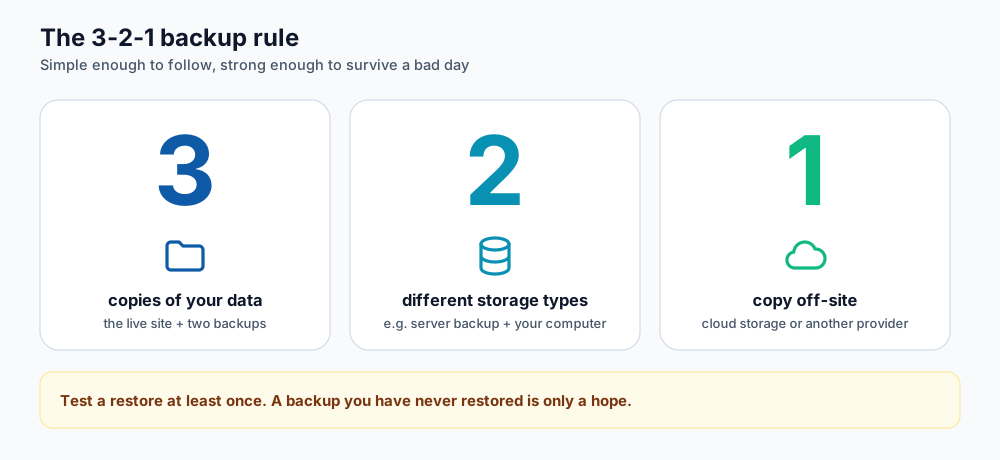
Three copies, on two kinds of storage, with one off-site.
- 3 copies: the live site and two backups.
- 2 storage types: for example the hosting provider's backup plus a download on your computer.
- 1 off-site: stored away from the hosting server, such as cloud storage in another account.
A simple routine for a small site
- Rely on the daily provider backup for everyday recovery.
- Before every big change (plugin update, theme switch, PHP upgrade) create a manual backup and download it.
- Once a month, store a full backup (files + database) in cloud storage you control.
- Twice a year, restore a backup to a test location to prove it works.
Making a manual backup
WordPress
Use a backup plugin that exports files and database to a zip you can download, or take a database export from phpMyAdmin and download the wp-content folder.
cPanel
Open the JetBackup tool and download a full account backup, or use Backup to download a partial backup of your home directory and databases.
Webuzo
Download your files with the File Manager or SFTP, and export databases through the database tools in your panel.
Restoring safely
- Restore into a test folder or subdomain first when you can.
- Remember that restoring a database overwrites newer posts, orders and comments.
- After restoring, clear caches and check that forms, login and checkout still work.
Frequently asked questions
How long are daily backups kept?
Retention depends on the server and plan. If you need a specific older copy, open a support ticket with the date as early as possible.
Does a backup protect me from malware?
It helps you recover, but a backup taken after an infection also contains the malware. Keep several dates so you can go back to a clean one, and clean the site before restoring.
Should I back up before updating WordPress?
Yes, every time. It takes a minute and turns a failed update into a minor inconvenience.
References and further reading
Last reviewed 19 October 2026. Need a hand? Contact DignityHost support or open a ticket from your client area.
