

What MERN hosting is, how a MongoDB, Express, React and Node.js app is laid out on a Webuzo account, and what you get on a DignityHost MERN plan.
- Applies toMERN hosting plans
- Time needed8 min read
- LevelBeginner to intermediate
The four letters
| Letter | Technology | Its job |
|---|---|---|
| M | MongoDB | Stores your data as flexible JSON-like documents. |
| E | Express | A small Node.js framework that exposes your API (routes, authentication, business logic). |
| R | React | The user interface that runs in the visitor's browser. |
| N | Node.js | The runtime that executes your server-side JavaScript. |
The browser loads your React app, the React app calls your Express API, and the API reads and writes MongoDB. Hosting a MERN app therefore means three things: somewhere to serve the built React files, a place where the Node.js API runs continuously, and a database it can reach.
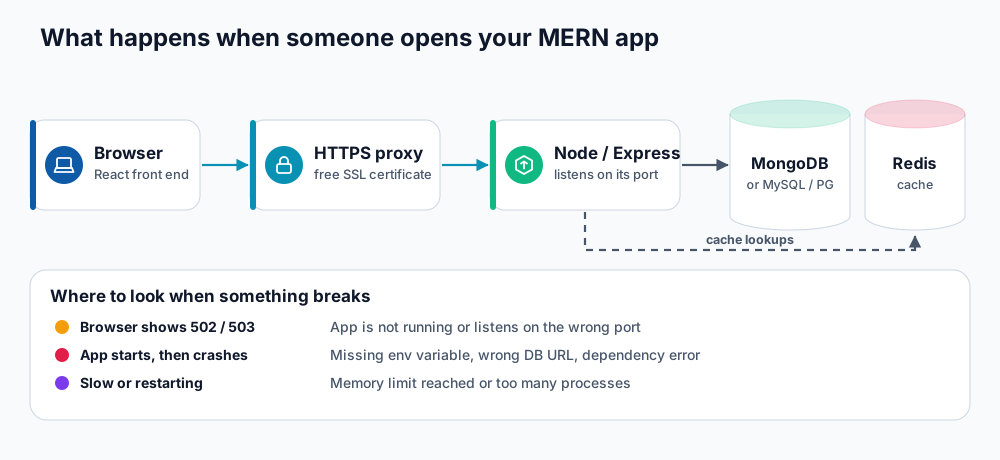
From browser to database and back.
What a DignityHost MERN plan gives you
- Webuzo control panel with an Application Manager for running Node.js applications.
- Node.js 18, 20 and 22 (LTS), with npm, Yarn and pnpm support.
- Databases: MongoDB, MySQL/MariaDB and PostgreSQL, plus Redis for caching.
- Free SSL (Let's Encrypt), daily backups and free migration.
- SSH access and GitHub/GitLab based deployment so updates are one command.
- A set number of Node.js applications, databases, email accounts and domains per plan, listed on the MERN hosting page.
A tidy layout for your account
/home/USERNAME
├── apps/
│   ├── shop-api/            <- Express API (Application Path: apps/shop-api)
│   │   ├── server.js
│   │   ├── package.json
│   │   └── .env             <- secrets, never committed
│   └── worker/              <- optional background worker
└── public_html/             <- React build output (the contents of dist/ or build/)
    ├── index.html
    └── assets/
A common setup uses two names: app.example.com for the React front end (static files) and api.example.com for the Node.js API. This keeps deployment simple and avoids routing the API through your front end.
Two ways to run a Node.js app
| Mode | How it works | Pick it when |
|---|---|---|
| Passenger | Webuzo starts your app through Phusion Passenger using a startup file such as server.js. Passenger connects to your listen() call for you. | You run a typical Express or Fastify API and want the simplest set-up. |
| Self Managed | Webuzo runs your own start command and expects the app to listen on the port Webuzo assigns. | You need a framework with its own server (Next.js, NestJS with custom boot, WebSockets) or full control of the start command. |
What MERN hosting is not
- It is not a full server. If you need root access, custom system packages or many always-on workers, a VPS is the better fit.
- It is not the place for tasks that need huge memory (video encoding, large ML models). Each account has CPU, memory and process limits; see memory and process limits.
Your first deployment
- Open your panel (see Webuzo login).
- Follow deploy an Express API for the back end.
- Follow deploy a React or Vite app for the front end.
- Connect a database with connect Node.js to MongoDB, MySQL, PostgreSQL and Redis.
- Store secrets safely using environment variables.
Frequently asked questions
Can I host Next.js, NestJS or Fastify too?
Yes. Any Node.js application can run in the Application Manager. Frameworks with their own server usually use Self Managed mode with a start command such as node server.js or next start.
Do I need MongoDB for a MERN app?
It is the M in MERN, but your Node.js API can equally use MySQL, PostgreSQL or Redis. Pick what suits your data.
Is shared MERN hosting suitable for production?
Yes for small to medium applications, APIs, dashboards and internal tools. Monitor usage and move to a VPS when you consistently approach the limits.
References and further reading
Last reviewed 19 October 2026. Need a hand? Contact DignityHost support or open a ticket from your client area.
