

Step-by-step: prepare an Express API, upload it, install dependencies and register it in Webuzo's Application Manager with the right port and environment.
- Applies toMERN hosting plans
- Time needed20 min
- LevelIntermediate
This guide takes a small Express API from your laptop to a live HTTPS address. The same steps apply to Fastify, Koa and other Node.js servers.
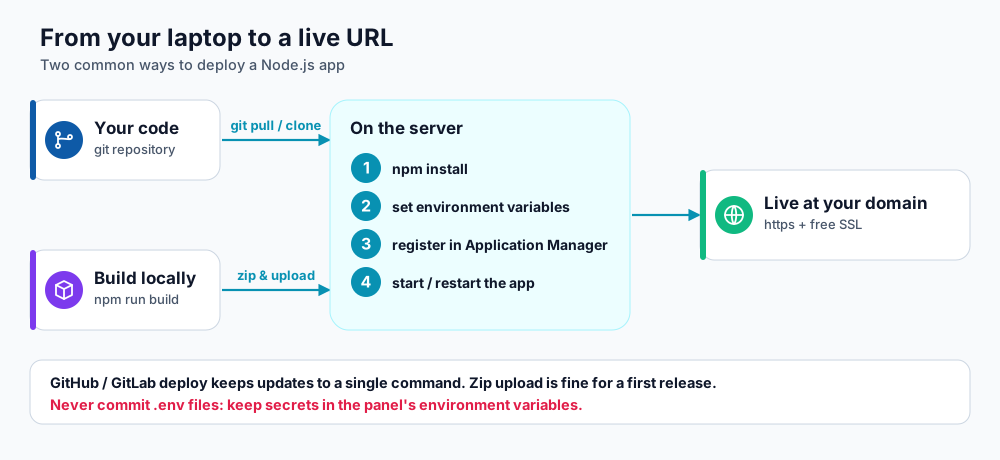
Pick git pull for repeat deployments or a zip upload for a first release.
1. Prepare the app
Your project needs a package.json with a start script, and a server file that listens for requests.
// server.js
const express = require('express');
const app = express();

app.use(express.json());
app.get('/health', (_req, res) => res.json({ ok: true }));

// Self Managed mode: use the port Webuzo shows in the Application Manager.
// Passenger mode ignores the number and connects the app for you.
const PORT = process.env.PORT || 3000;
app.listen(PORT, () => console.log('API listening on ' + PORT));{
"name": "shop-api",
"version": "1.0.0",
"main": "server.js",
"scripts": { "start": "node server.js" },
"engines": { "node": ">=20" },
"dependencies": { "express": "^4.19.2" }
}2. Create the domain
- Add a subdomain such as
api.example.comunder Domain Management in Webuzo. - Point its DNS A record to your server (see DNS propagation).
- Install the free certificate in Automatic SSL (see Free SSL in Webuzo).
3. Upload the code
Put the app in its own folder inside your home directory, for example ~/apps/shop-api, and not in public_html, where its source would be downloadable.
| Method | Commands or steps |
|---|---|
| Git (recommended) | ssh USERNAME@server, then git clone https://github.com/you/shop-api.git ~/apps/shop-api. Use a deploy key for private repositories. |
| Zip upload | Zip the project without node_modules, upload it with the File Manager, then extract it into ~/apps/shop-api. |
4. Install dependencies
Over SSH, choose the Node.js version that matches the one you will pick in the panel, then install only production dependencies:
export PATH=/usr/local/apps/nodejs20/bin:$PATH
node -v
cd ~/apps/shop-api
npm ci --omit=dev        # or: npm install --omit=dev
Yarn and pnpm work too. If your app needs a build step (TypeScript, NestJS), run it now (npm run build) and point the startup file at the compiled output, for example dist/main.js.
5. Register the application
Open Application Manager and click to add an application. Fill in the form as follows:
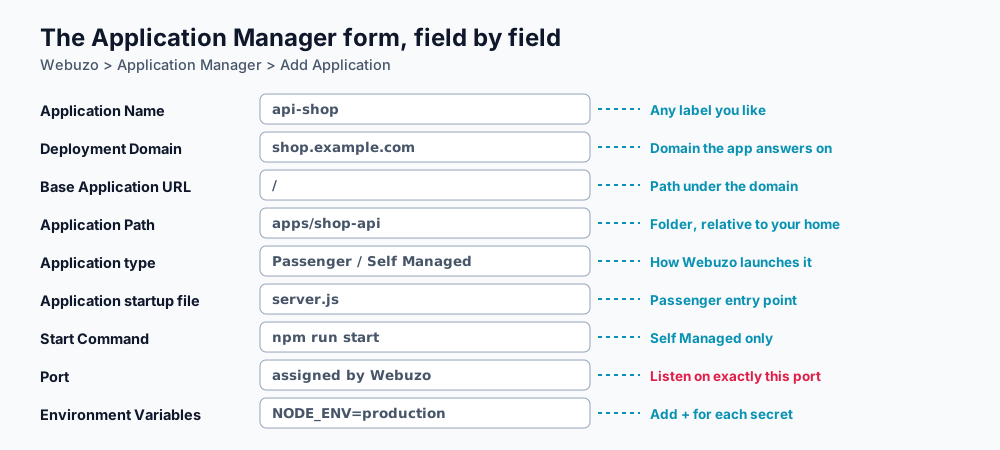
Webuzo's Application Manager fields.
| Field | What to enter |
|---|---|
| Application Name | A label, e.g. shop-api. |
| Deployment Domain | The domain you created, e.g. api.example.com. |
| Base Application URL | / unless the app lives under a path. |
| Application Path | Folder relative to your home directory: apps/shop-api. |
| Application type | The Node.js version, for example Node.js 20 or 22. |
| Startup file (Passenger) | server.js, the file that calls listen(). |
| Start Command (Self Managed) | node server.js. Prefer this to npm start, which starts an extra wrapper process. |
| Port | Shown by Webuzo. In Self Managed mode your app must listen on exactly this port. |
| Deployment Environment | Production for a live site. |
| Environment Variables | Use Add + for each value, e.g. PORT, MONGODB_URI, JWT_SECRET. |
Save the application and start it from the application list. Then open https://api.example.com/health; you should see {"ok":true}.
Updating later
export PATH=/usr/local/apps/nodejs20/bin:$PATH
cd ~/apps/shop-api
git pull
npm ci --omit=dev
# then restart the application from the Application Manager
Troubleshooting
- A 502 or blank page after start: see fix 502 and app-not-starting errors.
- The app restarts constantly or uses a lot of memory: see memory and process limits.
- Secrets: never commit
.env; see environment variables and .env files.
Frequently asked questions
Passenger or Self Managed?
Use Passenger for a plain Express API; it needs only a startup file. Use Self Managed when your framework needs its own start command or when you need WebSockets that must hold a stable port.
Where do I see the application's logs?
The application writes its output to a log file in your home directory named after the domain and the application ID. Open it with the File Manager, or run tail -f over SSH.
How do I deploy from GitHub Actions?
Use an SSH deploy key stored in your repository secrets, run the git pull and npm ci commands in a workflow step, and restart the app.
References and further reading
Last reviewed 19 October 2026. Need a hand? Contact DignityHost support or open a ticket from your client area.
