

Working connection code and settings for MongoDB, MySQL, PostgreSQL and Redis on DignityHost MERN hosting, plus pooling tips and common errors.
- Applies toMERN hosting plans
- Time needed20 min
- LevelIntermediate
Your application runs on the same server as the databases, so it connects to 127.0.0.1 and never travels over the internet. Create the database first, keep the credentials in environment variables, and reuse one connection (or pool) for the life of the process.
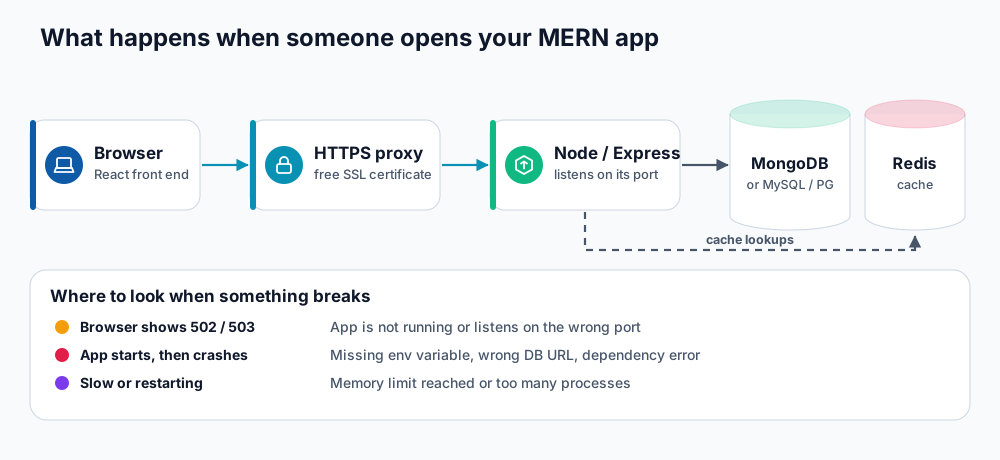
The API talks to the databases over localhost.
Get the credentials
| Database | How you get it |
|---|---|
| MySQL / MariaDB | Create the database and user in your panel (or with phpMyAdmin) and note the full names. |
| PostgreSQL | Create the database and role in the PostgreSQL manager in your panel. |
| MongoDB | Open a support ticket and ask for a MongoDB database and user for your account. You receive the database name, username and password. You can also use MongoDB Atlas instead. |
| Redis | Included with the plan. Ask support for connection details if you want to enable it for your application. |
MongoDB with Mongoose
const mongoose = require('mongoose');

async function connect() {
  await mongoose.connect(process.env.MONGODB_URI, { serverSelectionTimeoutMS: 8000, maxPoolSize: 5 });
  console.log('MongoDB connected');
}
connect().catch((e) => { console.error('MongoDB error', e.message); process.exit(1); });MONGODB_URI=mongodb://dbuser:[email protected]:27017/dbname?authSource=dbnameauthSourceis normally the database the user was created in.- Percent-encode special characters in the password (
@becomes%40,/becomes%2F). - Using MongoDB Atlas? Use the
mongodb+srv://string and allow your server's IP address in Atlas's Network Access list.
MySQL / MariaDB with mysql2
const mysql = require('mysql2/promise');

const pool = mysql.createPool({
  host: '127.0.0.1',
  user: process.env.DB_USER,
  password: process.env.DB_PASSWORD,
  database: process.env.DB_NAME,
  waitForConnections: true,
  connectionLimit: 5,
});

const [rows] = await pool.query('SELECT NOW() AS now');
PostgreSQL with pg
const { Pool } = require('pg');

const pool = new Pool({
  connectionString: process.env.DATABASE_URL, // postgresql://user:[email protected]:5432/dbname
  max: 5,
  idleTimeoutMillis: 30000,
});

const { rows } = await pool.query('SELECT NOW()');
Redis with ioredis
const Redis = require('ioredis');

const redis = new Redis(process.env.REDIS_URL || 'redis://127.0.0.1:6379', {
  maxRetriesPerRequest: 2,
  lazyConnect: true,
});
await redis.connect();
await redis.set('greeting', 'hello', 'EX', 60);
Use Redis for caching and short-lived data (sessions, rate limits), not as the only copy of anything important.
Good connection habits
- One pool per process. Create it at start-up and reuse it. Opening a new connection per request exhausts connections and memory.
- Keep pools small. A pool of 3 to 5 connections is plenty for an API on shared hosting.
- Handle errors and retries. Exit with a clear message when start-up connection fails, so the problem is visible in the log.
- Shut down cleanly. Close pools on
SIGTERMso restarts do not leave orphaned work. - Add a health route that runs a trivial query to confirm the database is reachable.
Common errors
| Error | Likely cause |
|---|---|
MongoServerError: Authentication failed | Wrong user or password, or the wrong authSource. |
ECONNREFUSED 127.0.0.1:27017 | Wrong port, or the database is not available for this account yet. |
ER_ACCESS_DENIED_ERROR | MySQL user not added to the database, or the password was changed. |
password authentication failed for user | PostgreSQL role or password mismatch. |
Too many connections | A new connection is created per request, or the pool is too large. |
To inspect data from your own computer, use an SSH tunnel; see connect to your database over SSH.
Frequently asked questions
Should I use Atlas instead of the local MongoDB?
Local MongoDB is fastest because there is no network hop. Atlas is useful if you want managed backups, replicas or access from several servers. Either works with the same code.
Can I connect to the database from another website?
Databases accept local connections only. Use an API on your hosting, an SSH tunnel for administration, or a managed database service for remote access.
Where should the connection string live?
In environment variables set in the Application Manager, never in source code.
References and further reading
Last reviewed 19 October 2026. Need a hand? Contact DignityHost support or open a ticket from your client area.
