

How to store database passwords, API keys and JWT secrets in environment variables on Node.js hosting, keep .env out of Git and respond to a leak.
- Applies toNode.js and PHP projects
- Time needed8 min
- LevelBeginner
Passwords, API keys and signing secrets should never be written into your source code. Environment variables keep them separate from the code, so the same repository can run on your laptop and on the server with different values.
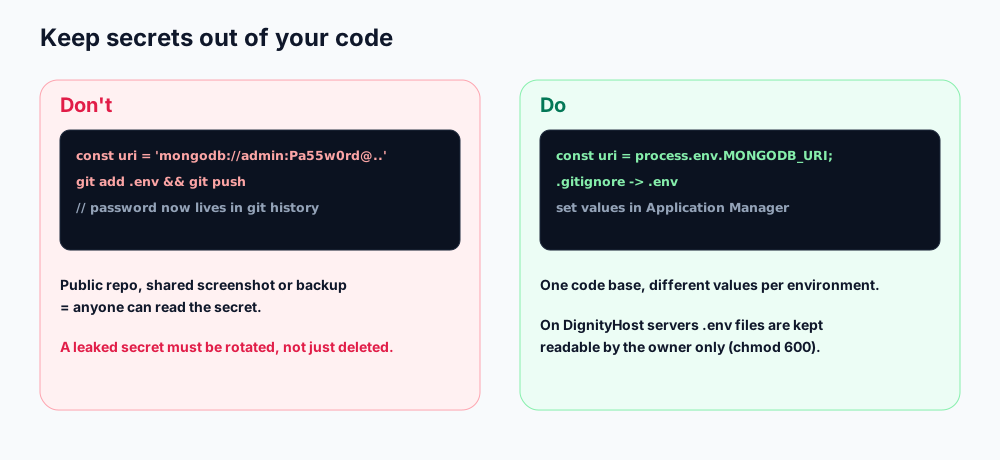
Secrets in code end up in Git history; environment variables stay on the server.
Where to put variables
| Place | Use it for |
|---|---|
| Application Manager → Environment Variables | Production values on the server (use Add + for each name and value). |
.env file in the app folder | Local development, or production when you prefer a file. Load it with the dotenv package. |
| Shell export | One-off commands and scripts (export NAME=value). |
Using a .env file with dotenv
NODE_ENV=production
PORT=3000
MONGODB_URI=mongodb://dbuser:[email protected]:27017/dbname?authSource=dbname
JWT_SECRET=paste-a-long-random-string-hererequire('dotenv').config();
const required = ['MONGODB_URI', 'JWT_SECRET'];
for (const k of required) {
if (!process.env[k]) { console.error('Missing env var: ' + k); process.exit(1); }
}Failing fast with a clear message is far easier to debug than an app that starts and then crashes on its first database call.
Generate strong secrets
openssl rand -hex 32      # 64 hex characters, good for JWT or session secrets
node -e "console.log(require('crypto').randomBytes(48).toString('base64url'))"
Keep .env out of Git
- Add
.envto.gitignorebefore your first commit. - Commit a
.env.examplewith the variable names and harmless placeholder values so teammates know what to set. - If a secret was ever committed, treat it as leaked (see below). Deleting the file in a later commit does not remove it from history.
.env files in your account are automatically kept readable by your account only, so other accounts on the same server cannot open them. You still should not place them in public_html, where the web server could serve them.Front-end variables are public
Values compiled into a React or Vite build (for example names starting with VITE_ or REACT_APP_) are visible to every visitor. Use them only for non-secret settings such as the API address. Anything secret must stay in your server-side code.
If a secret leaks
- Rotate it immediately: create a new database password, API key or JWT secret and update the server.
- Restart the application so it picks up the new value.
- Revoke the old key at the provider (payment gateway, email service, cloud account).
- Check logs and usage dashboards for activity you do not recognise.
- Remove the secret from Git history with a tool such as
git filter-repo, then force-push. Assume the old value is still known and keep it revoked.
Good habits
- Use a different secret for every environment and every service.
- Never print secrets in logs or error messages.
- Give each API key the minimum permissions and, where possible, a spending limit.
- Rotate important secrets on a schedule, for example every six months, and whenever someone with access leaves.
Frequently asked questions
Is a .env file safe on the server?
It is safe as long as it is outside public_html, readable only by your account and never committed to Git. Many people also set production values directly in the Application Manager instead.
Why does my variable show as undefined?
The app started before the variable was set, you edited .env but did not restart, or dotenv is loaded after the code that reads the value. Restart and load dotenv first.
Can I change variables without redeploying?
Yes. Edit them in the Application Manager and restart the application.
References and further reading
Last reviewed 19 October 2026. Need a hand? Contact DignityHost support or open a ticket from your client area.
