

A fast checklist to fix 502 Bad Gateway errors and Node.js apps that will not start: port, startup file, environment, logs and database checks.
- Applies toMERN hosting plans
- Time needed10 min
- LevelBeginner to intermediate
A 502 Bad Gateway (or 503) means the web server is fine but it could not get an answer from your application. Nearly every case comes down to four checks, in this order.
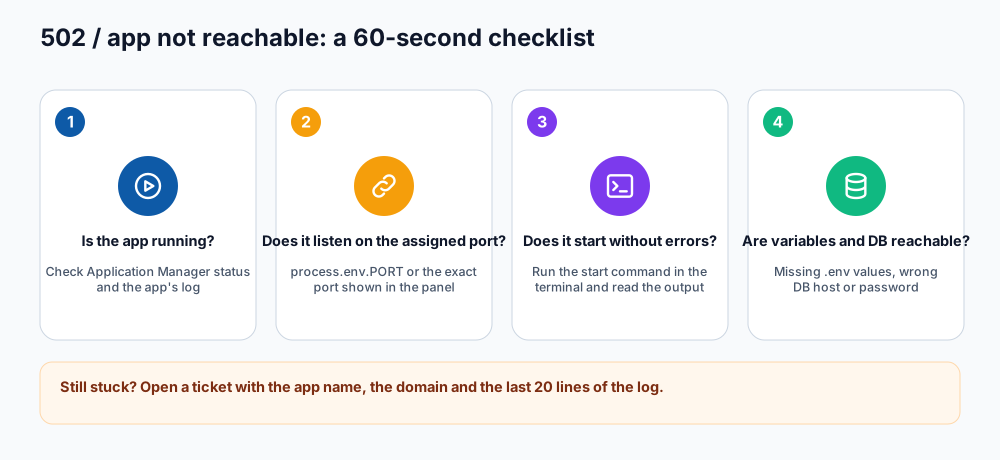
A 60-second checklist.
Check 1: is the application running?
- Open Application Manager and look at the status of the app. If it is stopped, start it.
- If it stops again straight away, the app is crashing at start-up. Go to check 3.
Check 2: does it listen on the assigned port? (Self Managed)
- Note the Port shown for your application in the Application Manager.
- Make sure your code listens on exactly that port. Setting it through an environment variable keeps the two in sync.
const PORT = process.env.PORT;           // set PORT in the Application Manager
if (!PORT) throw new Error('PORT is not set');
app.listen(PORT, () => console.log('listening on ' + PORT));.env says PORT=30067 but the panel assigned another port, the app runs but looks dead. Update the environment variable or the application's port so they match, then restart. In Passenger mode the port in your code does not matter.Check 3: does it start without errors?
Run the same command Webuzo runs, in an SSH session, and read the output:
export PATH=/usr/local/apps/nodejs20/bin:$PATH   # match the version chosen in the panel
cd ~/apps/shop-api
node server.js| Message | Cause and fix |
|---|---|
Cannot find module 'express' | Dependencies not installed. Run npm ci --omit=dev in the app folder. |
EADDRINUSE | Another copy is still running on that port. Stop it (see memory and process limits) and start only one. |
SyntaxError / unsupported syntax | The app needs a newer Node.js version. Pick Node.js 20 or 22 in the application settings. |
ERR_REQUIRE_ESM | A package is ES-module-only. Use import syntax with "type": "module" or an older compatible version. |
Missing env var ... | Add the variable in the Application Manager and restart. |
Error: Cannot find module './dist/main.js' | You did not run the build step (npm run build) or the startup file points to the wrong path. |
Check 4: environment variables and database
- Compare your local
.envwith the variables set in the Application Manager; nothing is copied automatically. - Test the database from the server: a wrong password or an unavailable MongoDB user produces a start-up error (see database connection guide).
- A reverse-proxy or CORS error in the browser console is different from a 502: your app responded but the front end blocked the answer.
Read the log
The application writes its output to a log file in your home directory, named after the domain and the application's ID (for example ~/api.example.com_AbC123.log). Open it in the File Manager or run:
tail -n 50 ~/api.example.com_*.log
tail -f ~/api.example.com_*.log     # follow new lines; press Ctrl+C to stop
Other causes
- Wrong startup file (Passenger): the file name or path in the form does not exist.
- Application Path points to the wrong folder. It is relative to your home directory, with no leading slash.
- Domain not pointing to the server or SSL not installed on that subdomain.
- Resource limit reached: see memory and process limits.
- Very slow start-up because the app downloads or builds something on boot; do that during deployment instead.
Ask support, with the right details
If you are still stuck, open a ticket with: the domain, the application name, the Node.js version, what changed last, and the last 20 lines of the log. That lets us help in one reply.
Frequently asked questions
Why does it work for a minute and then show 502 again?
The app is crashing or being stopped for memory. Check the log at the moment it failed and see the memory guide.
What is the difference between 502 and 503?
Both mean the app could not serve the request right now. 502 usually means no valid reply; 503 often means the app is starting or temporarily unavailable. The checklist is the same.
Do I need to restart after changing code?
Yes, restart the application so Node.js loads the new files.
References and further reading
Last reviewed 19 October 2026. Need a hand? Contact DignityHost support or open a ticket from your client area.
