

Set up a hosted Paperclip instance: domain, admin account, optional LLM keys and a first agent team to manage goals, tasks and costs in one dashboard.
- Applies toPaperclip hosting
- Time needed15 min
- LevelIntermediate
Paperclip is open-source software for running a team of AI agents like a company. It looks like a task manager, but under the hood it has an org chart, goals, budgets and governance. You bring the agents (OpenClaw, Hermes, Claude Code, Codex, Cursor, Gemini CLI and others); Paperclip assigns the work, tracks what each one costs and keeps a history.
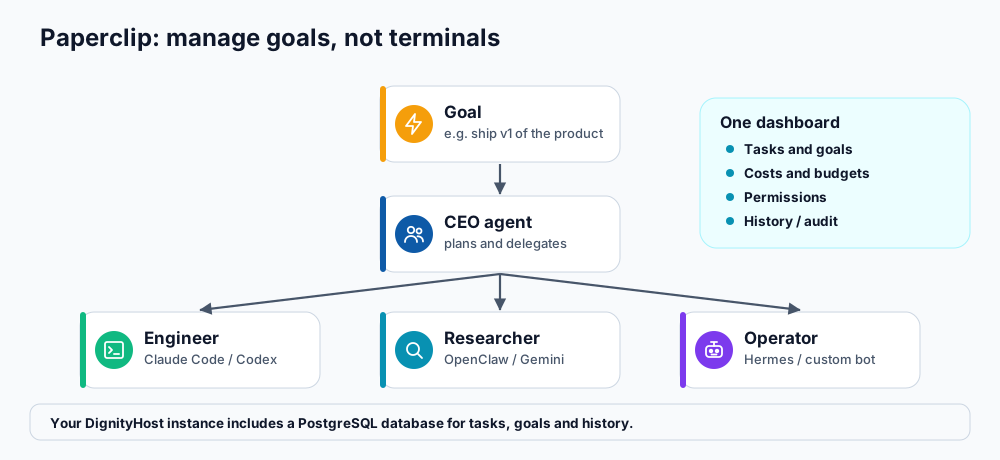
Manage goals, not terminals.
Is Paperclip right for you?
- You run several AI agents and lose track of what each one is doing.
- You want agents to work around the clock but still want to review their work and set budgets.
- You prefer managing outcomes (goals and tasks) over managing individual prompts.
If you only need one assistant to chat with, start with OpenClaw or Hermes Agent. Paperclip adds value once there are several agents to coordinate.
Set up your Paperclip instance
After ordering, open Paperclip in your dashboard and choose Set up your Paperclip instance.
| Field | What to enter |
|---|---|
| Domain | An address for your dashboard, for example agents.yourcompany.com. Point its DNS A record to the host first; SSL is configured automatically. |
| Admin name and email | The first administrator of the instance. |
| Password | At least 8 characters. Use a unique password. |
| Provider API keys (optional) | Anthropic, OpenAI, Gemini or Cursor keys, if you want Paperclip to use them. You can leave them blank and add agents later. |
- Submit the form. The page refreshes by itself about every 10 seconds while the instance is being created.
- When it shows as ready, open the instance URL and sign in with the admin email and password.
- Create your company, describe its first goal and add the agents that will work on it.
Your instance runs in its own container with a PostgreSQL database for tasks, goals and history, behind HTTPS.
Your first agent team
- Write the goal as an outcome with a deadline, for example "Publish ten helpful knowledge-base articles this month".
- Add a lead agent that plans and delegates, and one or two specialists (a writer, a researcher).
- Set budgets for each agent so spending cannot run away.
- Approve the plan before agents start, then monitor tasks and cost from the dashboard.
Costs and control
- Model usage is billed by your model providers and shows up as cost per agent in the dashboard.
- Use budgets and approvals so humans stay in the loop for anything important or irreversible.
- Review the history regularly; it is your audit trail for what each agent did and why.
Reset and recovery
The panel includes a reset option that deletes the Paperclip instance and its data so you can start again. It cannot be undone. Export or copy anything important first.
Frequently asked questions
Do I need other agents already?
Paperclip is most useful with agents to manage, but you can create a team inside Paperclip using the provider keys you add.
Can Paperclip run OpenClaw or Hermes agents?
Yes. Paperclip is built to work with several agent types, including OpenClaw and Hermes, so each can act as a team member.
What about security?
Your dashboard is protected by the admin login over HTTPS. Use a strong password, give each agent only the access it needs, and read the AI agent security checklist.
References and further reading
Last reviewed 19 October 2026. Need a hand? Contact DignityHost support or open a ticket from your client area.
