

SSL is installed but the browser still says Not Secure? Find mixed content, fix WordPress URLs and force HTTPS safely on DignityHost hosting.
- Applies tocPanel and Webuzo hosting
- Time needed15 min
- LevelBeginner
Why the padlock goes missing
A valid certificate only protects the page itself. If that HTTPS page also loads an image, script or stylesheet from an http:// address, the browser flags the page as "not fully secure" or blocks the file. This is called mixed content, and it is the most common SSL problem after a site moves to HTTPS.
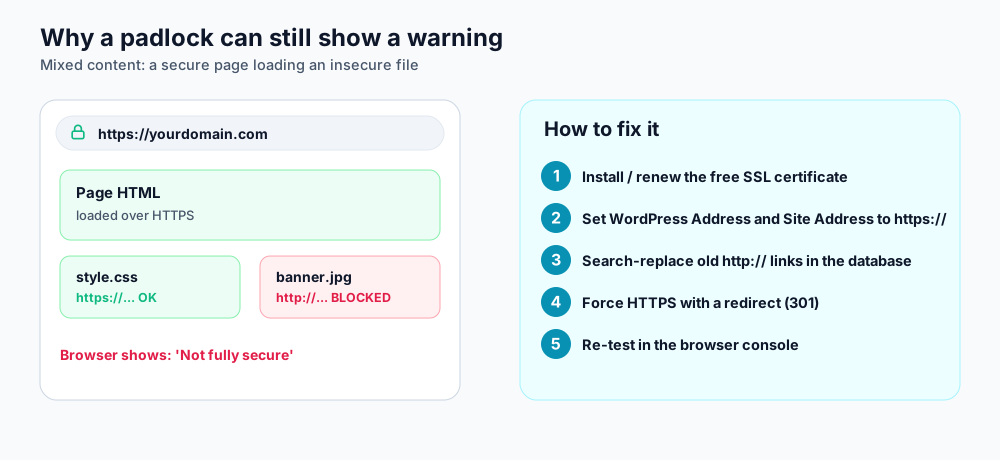
Mixed content: a single insecure file is enough to trigger the warning.
Step 1: confirm the certificate is installed
All DignityHost hosting plans include a free Let's Encrypt certificate. On cPanel it is issued by AutoSSL; on Webuzo use Automatic SSL (see Free SSL in Webuzo). Open https://yourdomain.com. If the browser reports an invalid certificate rather than mixed content, the certificate itself needs attention first; check that your domain's DNS points to your hosting account.
Step 2: find the insecure files
- Open your site in Chrome, Edge or Firefox and press F12 to open developer tools.
- Go to the Console tab and reload the page. Mixed content messages list the exact
http://URL. - Note where each file comes from: your own database, theme files, a page builder, or an external service.
Step 3: fix WordPress addresses
- In Settings → General, change both WordPress Address (URL) and Site Address (URL) to start with
https://. - Replace old links stored in the database. Back up first, then use a search-replace plugin or WP-CLI (run a dry run before the real replace).
- Clear your cache plugin and any CDN cache, then reload.
wp search-replace 'http://yourdomain.com' 'https://yourdomain.com' --all-tables --dry-run
wp search-replace 'http://yourdomain.com' 'https://yourdomain.com' --all-tablesStep 4: force HTTPS with a redirect
Add this to the .htaccess file in your site's root folder (above the WordPress block). It works on Apache, LiteSpeed and OpenLiteSpeed.
RewriteEngine On
RewriteCond %{HTTPS} !=on
RewriteRule ^ https://%{HTTP_HOST}%{REQUEST_URI} [L,R=301]
Using Cloudflare? Check these two things
- Set SSL/TLS mode to Full (strict). "Flexible" mode talks to your server over HTTP and creates endless redirect loops once you force HTTPS.
- If the certificate cannot be issued, temporarily set the DNS record to DNS only (grey cloud), issue the certificate, then switch the proxy back on.
Still showing a warning?
- Hard-coded
http://links inside theme options, widgets or page-builder templates often survive a database search-replace; re-save those templates. - Fonts, scripts and iframes loaded from other websites must also support HTTPS. Replace the URL or remove the item.
- Test the result on SSL Labs to confirm the certificate chain is complete.
Frequently asked questions
Is the free Let's Encrypt certificate good enough?
Yes for almost every website. It uses the same encryption as paid certificates. Paid options mainly add warranty or organisation validation, which most sites do not need.
Does HTTPS help SEO?
Search engines treat HTTPS as a small ranking signal, and browsers warn visitors about insecure pages, which affects trust and conversions.
How often is the certificate renewed?
Automatically. Let's Encrypt certificates last 90 days and the hosting panel renews them before they expire, as long as your DNS still points to the account.
References and further reading
Last reviewed 19 October 2026. Need a hand? Contact DignityHost support or open a ticket from your client area.
