

Schedule tasks in Webuzo with the Cron Job page. Includes the correct Node.js and PHP paths, a safe wrapper script and fixes for common cron problems.

- Applies toWebuzo hosting plans
- Time needed10 min
- LevelIntermediate
Cron runs commands on a schedule, even when nobody is logged in. In Webuzo the Cron Job page gives you a form with ready-made schedules, so you only need to supply the command.
Add a cron job
- Open Cron Job in the Webuzo panel and click Add Cron Job.
- Pick a schedule under Common Settings (every minute, every five minutes, hourly, daily, weekly...) or fill in minute, hour, day, month and weekday yourself.
- Enter the command and save. The new job appears in the list; you can edit or delete it there.
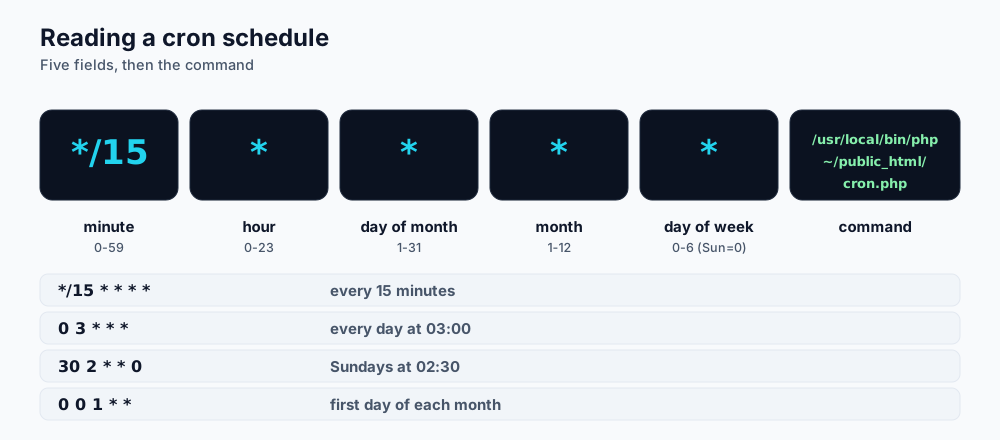
Five time fields and a command.
Use full paths
Cron starts with a very small environment, so node or php alone often cannot be found. Use the full path to the version you want:
| Runtime | Path |
|---|---|
| Node.js 18 | /usr/local/apps/nodejs18/bin/node |
| Node.js 20 | /usr/local/apps/nodejs20/bin/node |
| Node.js 22 | /usr/local/apps/nodejs22/bin/node |
| PHP 8.3 | /usr/local/apps/php83/bin/php |
| PHP 8.2 | /usr/local/apps/php82/bin/php |
Examples
# Every 15 minutes: run a Node.js cleanup script
*/15 * * * * cd /home/USERNAME/apps/shop-api && /usr/local/apps/nodejs20/bin/node scripts/cleanup.js >> /home/USERNAME/cron.log 2>&1

# Every day at 03:00: run a PHP script
0 3 * * * /usr/local/apps/php83/bin/php /home/USERNAME/public_html/tasks/daily.php >/dev/null 2>&1

# WordPress scheduled tasks every 10 minutes
*/10 * * * * /usr/local/apps/php83/bin/php /home/USERNAME/public_html/wp-cron.php >/dev/null 2>&1
A wrapper script keeps jobs tidy
When a job needs several commands or npm, put them in a shell script and call the script from cron.
#!/bin/bash
# /home/USERNAME/bin/nightly.sh
export PATH=/usr/local/apps/nodejs20/bin:$PATH
cd /home/USERNAME/apps/shop-api || exit 1
node scripts/rebuild-index.js
node scripts/send-digest.js- Create the file, then make it executable:
chmod +x /home/USERNAME/bin/nightly.sh. - Add a cron job with the command
/home/USERNAME/bin/nightly.sh >> /home/USERNAME/cron.log 2>&1.
% means "new line". If your command uses date +%F or similar, write date +\%F, or move the command into a script.Troubleshooting
- No output and nothing happens: redirect output to a log file as shown above and read it.
- "command not found": use absolute paths for the runtime and the script.
- Works in the terminal but not in cron: environment variables (like those set in the Application Manager) are not loaded by cron. Export what you need in the script or read a
.envfile. - Job runs twice: check for the same job listed more than once, or for an application that schedules itself internally.
- Running too long: overlapping runs consume memory and process limits. Use a lock file or increase the interval.
Frequently asked questions
Can I run a long-lived Node process with cron?
Do not use cron to keep servers alive. Run web servers and workers as applications in the Application Manager so they are started and monitored properly.
How do I stop a job?
Delete or edit it on the Cron Job page.
Does cron count against my resource limits?
Yes. Cron jobs use the same memory, CPU and process allowance as your website.
References and further reading
Last reviewed 19 October 2026. Need a hand? Contact DignityHost support or open a ticket from your client area.
