

Add a cron job in cPanel step by step, read the five schedule fields, and copy ready-made examples for WordPress, PHP scripts and Laravel.

- Applies tocPanel hosting plans
- Time needed10 min
- LevelIntermediate
A cron job runs a command on a schedule: clear a cache every night, send reports each morning, or trigger WordPress's own scheduler on time. cPanel gives you a form so you do not need a terminal.
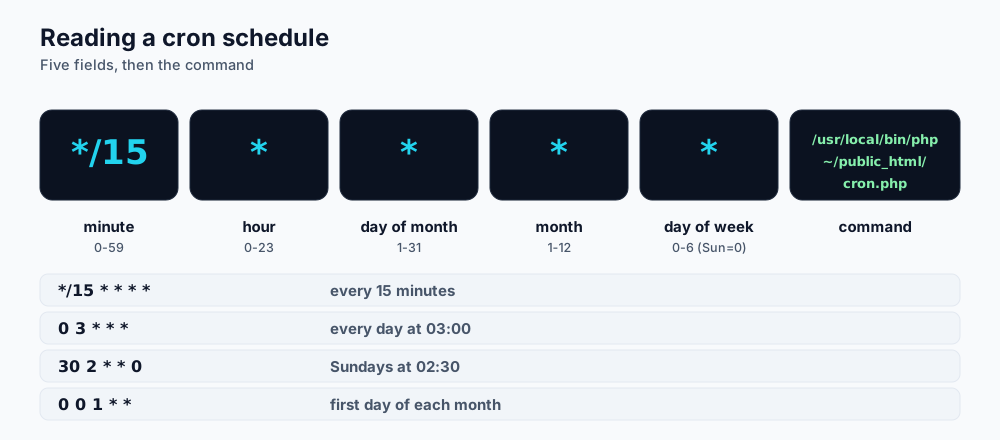
Five time fields, then the command to run.
Add a cron job
- Open Advanced → Cron Jobs in cPanel.
- Under Cron Email enter an address if you want output mailed to you, or leave it blank and discard output in the command.
- Under Add New Cron Job pick a schedule from Common Settings, or fill in minute, hour, day, month and weekday by hand.
- Type the command in the Command box and click Add New Cron Job.
Reading the schedule
| Schedule | Meaning |
|---|---|
*/15 * * * * | Every 15 minutes |
0 * * * * | Every hour, on the hour |
0 3 * * * | Every day at 03:00 (server time) |
30 2 * * 0 | Sundays at 02:30 |
0 0 1 * * | First day of every month at midnight |
Ready-made examples
Replace CPUSER with your cPanel username and adjust paths.
Run WordPress scheduled tasks on time
By default WordPress runs its scheduler when someone visits the site, which is unreliable on quiet sites and wasteful on busy ones. Switch to a real cron job:
- Add this line to
wp-config.php:define( 'DISABLE_WP_CRON', true ); - Create a cron job every 15 minutes (or every 5 for shops and membership sites) with the command below.
/usr/local/bin/php /home/CPUSER/public_html/wp-cron.php >/dev/null 2>&1Run any PHP script
/usr/local/bin/php /home/CPUSER/public_html/scripts/cleanup.php >/dev/null 2>&1Laravel scheduler
cd /home/CPUSER/app && /usr/local/bin/php artisan schedule:run >> /dev/null 2>&1 # run every minute: * * * * *Database backup every night
Store the database password in a private file so it does not appear in the cron line, then dump and compress. Note that every % in a cron command must be written as \%, because cron treats a bare percent sign as a line break.
# one-time setup (in a file only you can read): ~/.my.cnf
# [client]
# user=cpuser_shopuser
# password=your-strong-password

0 2 * * * mysqldump --defaults-file=/home/CPUSER/.my.cnf cpuser_shop | gzip > /home/CPUSER/backups/shop-$(date +\%F).sql.gz
Pin a specific PHP version
/opt/cpanel/ea-php83/root/usr/bin/php /home/CPUSER/public_html/scripts/job.phpTroubleshooting
- Nothing happens: run the command by hand in a test script and add
2>&1 >> /home/CPUSER/cron.logto capture errors. - Too many emails: add
>/dev/null 2>&1to the end of the command. - "command not found": use full paths for PHP and for your script.
- Job overlaps itself: make the interval longer than the job's runtime, or add a lock file.
Frequently asked questions
What is the shortest interval?
Every minute. Use it sparingly; frequent heavy jobs count against your account's resource limits.
Can cron jobs run Node.js or Python?
On cPanel plans use PHP or shell scripts. Node.js applications run on MERN plans; see the Webuzo cron guide.
My host blocks long scripts. What now?
Split the job into smaller batches, or move heavy processing to a queue worker on a VPS.
References and further reading
Last reviewed 19 October 2026. Need a hand? Contact DignityHost support or open a ticket from your client area.
