

Shared hosting, VPS or managed app hosting? A plain-English guide to choosing the right type of hosting for your website, store or app.
- Applies toAnyone choosing a plan
- Time needed6 min read
- LevelBeginner
The short answer
Most new websites belong on shared hosting. You move to a VPS when you need root access, custom software or guaranteed resources, and you choose managed app hosting when you want a specific tool (for example n8n or an AI agent) running without maintaining a server yourself.
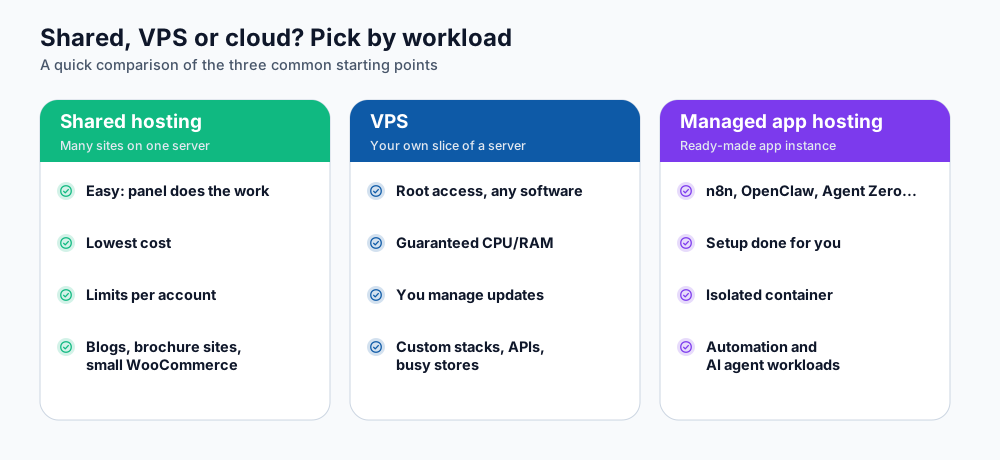
Shared hosting, VPS and managed app hosting side by side.
Shared hosting: the easiest start
On shared hosting many websites live on one powerful server. Each account is isolated and has its own limits for storage, processes and memory, and a control panel (cPanel or Webuzo) lets you do everything from a browser. The provider handles operating-system updates, security patches and backups.
- Best for: blogs, company websites, portfolios, small online stores and WordPress sites.
- You manage: your files, databases, email accounts and plugins. You do not manage the server.
- Limit to watch: CPU, memory and number of processes per account. Heavy background jobs do not belong here.
DignityHost shared plans include free SSL (Let's Encrypt), daily backups and free migration. See the web hosting plans or the WordPress hosting plans for current limits.
VPS: your own slice of a server
A virtual private server gives you dedicated CPU and RAM and full root access. That freedom comes with responsibility: you install software, apply updates, configure the firewall and monitor the machine.
- Best for: custom stacks, APIs with steady traffic, stores that outgrew shared hosting, and software that needs system-level access.
- You manage: everything from the operating system up (or buy a managed option).
- Good sign you need one: you keep hitting resource limits even after optimising, or you need a background worker that runs 24/7.
Managed app hosting: the tool, ready to use
Some software is awkward to install and keep running. For those cases DignityHost provides ready-made instances: an isolated container with its own domain, SSL certificate and a management panel. Examples are n8n workflow automation, OpenClaw, Hermes Agent, Agent Zero and Paperclip. You pay for the instance, not for server administration.
A simple way to decide
| Your situation | Start with |
|---|---|
| First website, blog or business site | Shared hosting |
| WordPress or WooCommerce shop with moderate traffic | WordPress / ecommerce shared hosting |
| Visitors are mostly in Bangladesh | BDIX hosting |
| Node.js, React or MongoDB application | MERN hosting |
| Automations between your apps | n8n hosting |
| An always-on AI assistant or agent | AI agent hosting |
| Custom server software or root access | VPS |
Frequently asked questions
Is shared hosting slow?
Not when it is well run. Server-side caching (LiteSpeed Cache on WordPress, for example), fast SSD or NVMe storage and sensible per-account limits keep most sites quick. Slowness usually comes from heavy plugins, large images or an outdated PHP version.
Can I move from shared hosting to a VPS later?
Yes. The usual route is to back up your files and database, restore them on the new server and switch DNS. DignityHost offers free migration help; see the migration guide linked below.
Do I need a VPS to run Node.js?
No. DignityHost MERN plans run Node.js applications on shared infrastructure with Webuzo. A VPS is only necessary when you need system packages, many background workers or full control.
References and further reading
Last reviewed 19 October 2026. Need a hand? Contact DignityHost support or open a ticket from your client area.
