

What n8n is, what you can automate with it and how to launch, open and set up your own managed n8n instance on DignityHost in a few minutes.
- Applies ton8n hosting plans
- Time needed10 min read
- LevelBeginner
What is n8n?
n8n is a workflow automation platform. You build workflows on a visual canvas by connecting nodes: a trigger (a webhook, a schedule, a new email) followed by steps that fetch data, transform it, call APIs, use AI and send results somewhere. It offers hundreds of integrations and lets you drop in JavaScript or Python when a ready-made node is not enough.
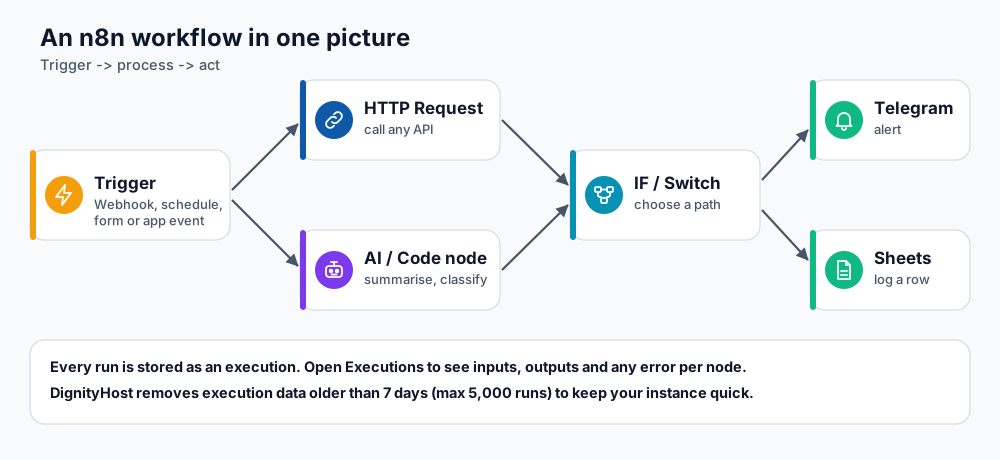
A typical workflow: trigger, process, decide, act.
Because n8n can be self-hosted, your workflows, credentials and data stay on infrastructure you control. A managed n8n instance from DignityHost gives you that without installing or maintaining anything.
What you get with DignityHost n8n hosting
- A dedicated n8n instance in its own isolated container, not shared with other customers.
- Instant activation, SSL on your address and optional custom domain.
- A management panel with live resource usage, logs, security settings, backups and domain tools.
- Scheduled workflow backups that include credentials, and one-click import/export.
- Unlimited workflows within your plan's resources, and 24/7 support.
| Plan | Resources | Database |
|---|---|---|
| Basic | 1 vCPU, 512 MB RAM, 1 GB NVMe | SQL database, for small workloads |
| Premium | 1 vCPU, 1 GB RAM, 3 GB NVMe | SQL database, for small workloads |
| Business | 2 vCPU, 2 GB RAM, 5 GB NVMe | PostgreSQL, for production |
| Enterprise | 2 vCPU, 4 GB RAM, 10 GB NVMe | PostgreSQL with Redis queue workers, for high scale |
Plan details can change; see the n8n hosting page for current limits, including the Plus plans.
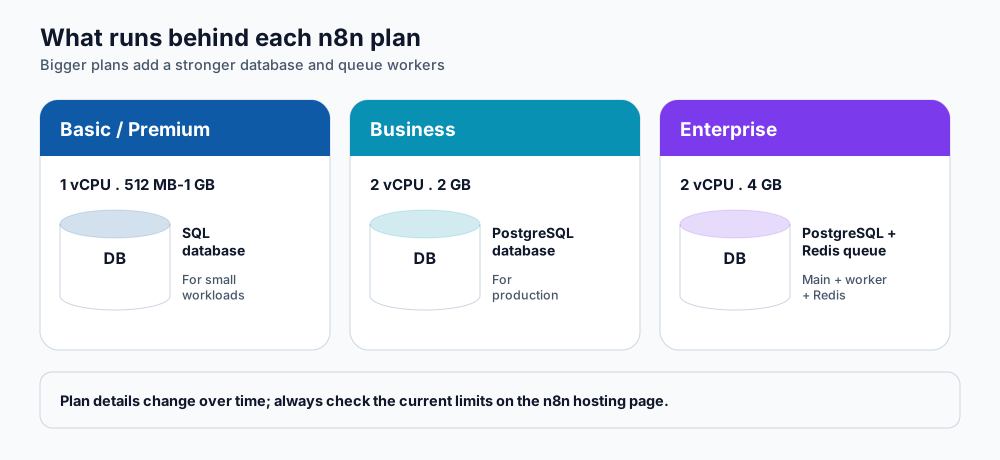
Higher plans add a stronger database and queue workers.
Launch and open your instance
- Order an n8n plan and complete payment. The instance is provisioned automatically.
- In the client area open Services → My Services and click your n8n service.
- Use the manage screen to see your instance address (for example
yourname.n8n.dignityhost.com), status and plan limits on the Overview tab. - Open the instance address in your browser. The first visit asks you to create the owner account: enter your name, email and a strong password. This is your n8n login.
What the panel tabs do
| Tab | Use it to |
|---|---|
| Overview | See the domain, version, status and plan limits for CPU, memory and disk. |
| Resources | Watch live CPU and memory usage (refreshes about every 10 seconds) and the container roles. |
| Workflows | Back up your workflows to JSON and schedule automatic backups. See n8n backups. |
| Logs | Read the service logs when a workflow or the instance misbehaves. |
| Security | Check SSL status and restrict access by IP. See securing n8n. |
| Settings | Change the instance domain (Domain Management), regenerate the service configuration (Service Repair) or use the Danger Zone to reset. See custom domain and webhooks. |
Build your first workflow in five minutes
- Create a new workflow and add a Schedule Trigger set to run every morning.
- Add an HTTP Request node that calls any public API (for example your website's health URL).
- Add an IF node to check the response status.
- On the failure branch add a Telegram or Email node to alert you.
- Click Execute workflow to test, then switch the workflow to Active.
Need ideas? See 10 practical n8n automations.
Frequently asked questions
Is n8n free?
n8n's source code can be self-hosted under its own fair-code licence. With DignityHost you pay for the managed hosting plan; the integrations you connect may have their own costs.
What do the reset options do?
In Settings → Danger Zone, a Soft Reset deletes all n8n user accounts but keeps your workflows and credentials, so you can create a new owner account if you are locked out. A Full Reset deletes everything and gives you a fresh instance. Back up first (see n8n backups).
Can I move my existing n8n workflows here?
Yes. Export your workflows as JSON from your old n8n and import them, or use the import option in the panel. Re-create credentials in the new instance.
Which plan do I need?
Basic and Premium suit personal and light business automations. Choose Business for production workloads that need PostgreSQL, and Enterprise when many workflows run at the same time and need queue workers.
References and further reading
Last reviewed 19 October 2026. Need a hand? Contact DignityHost support or open a ticket from your client area.
