

Use your own domain with n8n hosting: add the DNS record, save the domain, let SSL issue automatically and update webhook URLs in connected apps.
- Applies ton8n hosting plans
- Time needed10 min
- LevelBeginner to intermediate
Every n8n instance starts on a DignityHost address with HTTPS already working. A custom domain such as automation.yourcompany.com looks more professional and keeps your webhook URLs stable if you ever change provider.
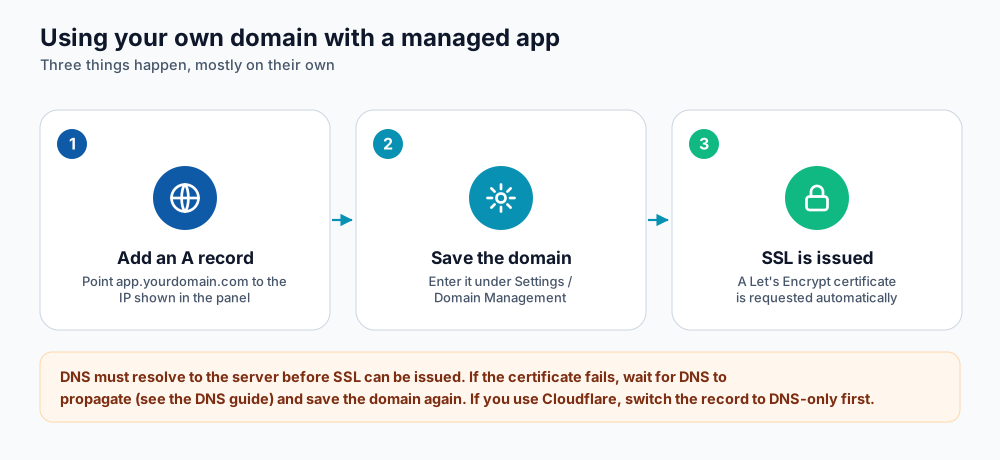
Add the DNS record, save the domain, and SSL follows automatically.
Step 1: add the DNS record
- Open your n8n service in the client area and go to Settings → Domain Management. A blue note shows DNS: Point your domain's A record to followed by an IP address. Copy it.
- At your DNS provider, create an A record for the name you want (for example
automation) pointing to that IP address. - Wait until the record resolves (see DNS propagation). You can check with
dig +short automation.yourcompany.com.
Step 2: save the domain in the panel
- In Domain Management choose Custom Domain from the drop-down, then type your domain in Enter your own domain (for example
automation.yourcompany.com). - Click Update Domain. The panel says that SSL is configured automatically after the change; allow a minute or two for the instance to be reconfigured.
- Open the new address. The padlock should appear once the certificate has been issued.
To go back to the original address at any time, choose Revert to Default from the same drop-down and update again.
Step 3: check SSL
Open the Security tab. SSL Certificate Status shows the domain, the issuer, the valid-from and valid-to dates, the days remaining and how it was verified. The certificate renews automatically before it expires, as long as the domain still points to the instance.
Update your webhook URLs
n8n builds webhook addresses from the instance domain. After you switch domains, every webhook URL changes, so update them in the apps that call n8n (payment gateways, forms, GitHub, Telegram bots and so on).
| Item | Format |
|---|---|
| Production webhook URL | https://automation.yourcompany.com/webhook/<path> |
| Test webhook URL | https://automation.yourcompany.com/webhook-test/<path> |
- The test URL works only while you click Listen for test event in the editor. The production URL works when the workflow is Active.
- Keep the old address working for a while if you can, or update each integration the same day.
- Webhook paths are secrets in practice. Use long random paths, and verify a signature or shared token inside the workflow when the sender supports it.
Troubleshooting
| Problem | Likely cause and fix |
|---|---|
| Certificate not issued | DNS does not point to the instance yet, or a proxy hides it. Fix DNS and wait, then save the domain again. |
| Webhook returns 404 | The workflow is not active, the method (GET/POST) differs, or you used the test URL in production. |
| Something stopped working after the change | Try Service Repair → Regenerate Config in Settings, which rebuilds the service configuration file. |
| Editor shows the wrong URL in the webhook node | Reload the editor after changing domain; the URL is generated from the current instance address. |
| Redirect loop with Cloudflare | Set SSL/TLS to Full (strict) rather than Flexible. |
Frequently asked questions
Can I use a root domain such as example.com?
A subdomain is recommended. Root domains cannot use CNAME records and are often needed for your main website.
Will my workflows or credentials change?
No. Only the address changes. Your data stays in the same instance.
Does the custom domain cost extra?
No extra charge from DignityHost for the domain mapping and the free SSL certificate. You pay your domain registrar for the domain itself.
References and further reading
Last reviewed 19 October 2026. Need a hand? Contact DignityHost support or open a ticket from your client area.
