

Ten useful n8n workflow ideas with the exact node chain for each: uptime alerts, lead capture, order notifications, AI email triage, reports and more.
- Applies toAny n8n instance
- Time needed10 min read
- LevelBeginner
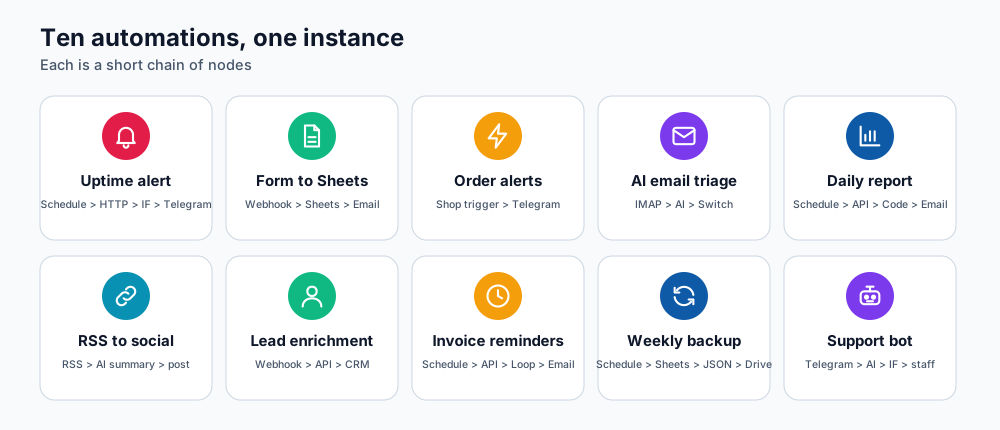
Ten automations and the nodes they use.
The best way to learn n8n is to automate something you already do by hand. These ten ideas each come with the node chain, so you can recreate them quickly on your own instance (see getting started with n8n).
1. Website uptime alert
Chain: Schedule Trigger (every 5 minutes) → HTTP Request (your URL) → IF (status is not 200) → Telegram or Email.
Get a message the moment your site returns an error. Add a Wait and a second check before alerting to avoid false alarms.
2. Website form to Google Sheets and a confirmation email
Chain: Webhook → Google Sheets (append row) → Gmail or SMTP (confirmation to the visitor) → Respond to Webhook.
Send your site's contact form to the Webhook URL. Every enquiry is logged and the visitor gets an instant reply.
3. New WooCommerce order to Telegram or Slack
Chain: WooCommerce Trigger (order created) → Set (format a short message) → Telegram / Slack.
Know about every sale instantly, with order number, total and city.
4. AI email triage
Chain: Email Trigger (IMAP) → OpenAI (classify: billing, support, sales, spam) → Switch → label the email or notify the right person.
Keep a human in the loop: let the workflow draft replies and mark them for review rather than sending automatically.
5. Daily business report
Chain: Schedule Trigger (08:00) → HTTP Request or database node (yesterday's numbers) → Code (calculate totals) → Email or Telegram.
6. RSS to social posts with an AI summary
Chain: RSS Feed Trigger → OpenAI (write a two-line summary) → social or Telegram channel node.
7. Lead capture and enrichment
Chain: Webhook (landing page) → HTTP Request (enrichment API) → CRM node (create contact) → Slack notification to sales.
8. Invoice and payment reminders
Chain: Schedule Trigger → HTTP Request to your billing system's API (unpaid invoices due in 3 days) → Loop Over Items → Email.
9. Weekly backup of important data
Chain: Schedule Trigger (weekly) → Google Sheets or Airtable (read all) → Convert to File (JSON/CSV) → Drive or storage upload.
10. Support chatbot hand-off
Chain: Telegram Trigger → OpenAI (answer from your FAQ text) → IF (needs a human?) → notify staff or send the answer.
Tips for reliable workflows
- Add an Error Trigger workflow that alerts you when any other workflow fails.
- Use Set nodes to name and shape data clearly; future you will thank you.
- Process large lists with Loop Over Items in batches to avoid memory spikes.
- Store credentials once and reuse them; never paste API keys into nodes.
- Review the Logs and Resources tabs of your panel after adding heavy workflows.
Frequently asked questions
Do I need to code?
No. Most of these use only built-in nodes. The Code node is optional for custom logic.
Which plan do I need?
Basic and Premium comfortably run light automations. Production workloads with many concurrent runs fit Business or Enterprise.
Can n8n call an AI agent?
Yes. Use the HTTP Request node to call an agent's API, such as a Hermes Agent API Server; see the AI agent platforms guide.
References and further reading
Last reviewed 19 October 2026. Need a hand? Contact DignityHost support or open a ticket from your client area.
